Busbar Analysis

Click "Open in Colab" to experiment with different parameters
Table of Contents
Theory
Energy Balance Equation
Busbar Specific Variables
Key Equations
| Equation | Formula |
|---|---|
| Heat Generation | |
| Convection (Dissipation) | |
| Cross-Section Area | |
| Surface Area (Cooling) | |
| Temp-Dependent Resistance | |
| Mass |
Heat Transfer Variables
| Symbol | Definition | Unit (SI) |
|---|---|---|
| Rate of internal heat generation (Joule heating) | Watts (W) | |
| Rate of heat loss via convection | Watts (W) | |
| Electrical current flowing through the busbar | Amperes (A) | |
| Electrical resistance (temp-dependent) | Ohms ( |
|
| Resistance at the reference temperature | Ohms ( |
|
| Electrical resistivity of the material | ||
| Length of the busbar | Meters (m) | |
| Width of the busbar | Meters (m) | |
| Height of the busbar | Meters (m) | |
| Cross-sectional area | ||
| Surface area for cooling | ||
| Convective heat transfer coefficient | ||
| Instantaneous temperature of the busbar | ||
| Ambient temperature of the surrounding air | ||
| Reference temperature (usually |
||
| Temperature coefficient of resistance | ||
| Mass of the busbar | Kilograms (kg) | |
| Specific heat capacity of the material | ||
| Time | Seconds (s) |
Simulation Results
Temperature Response Plot
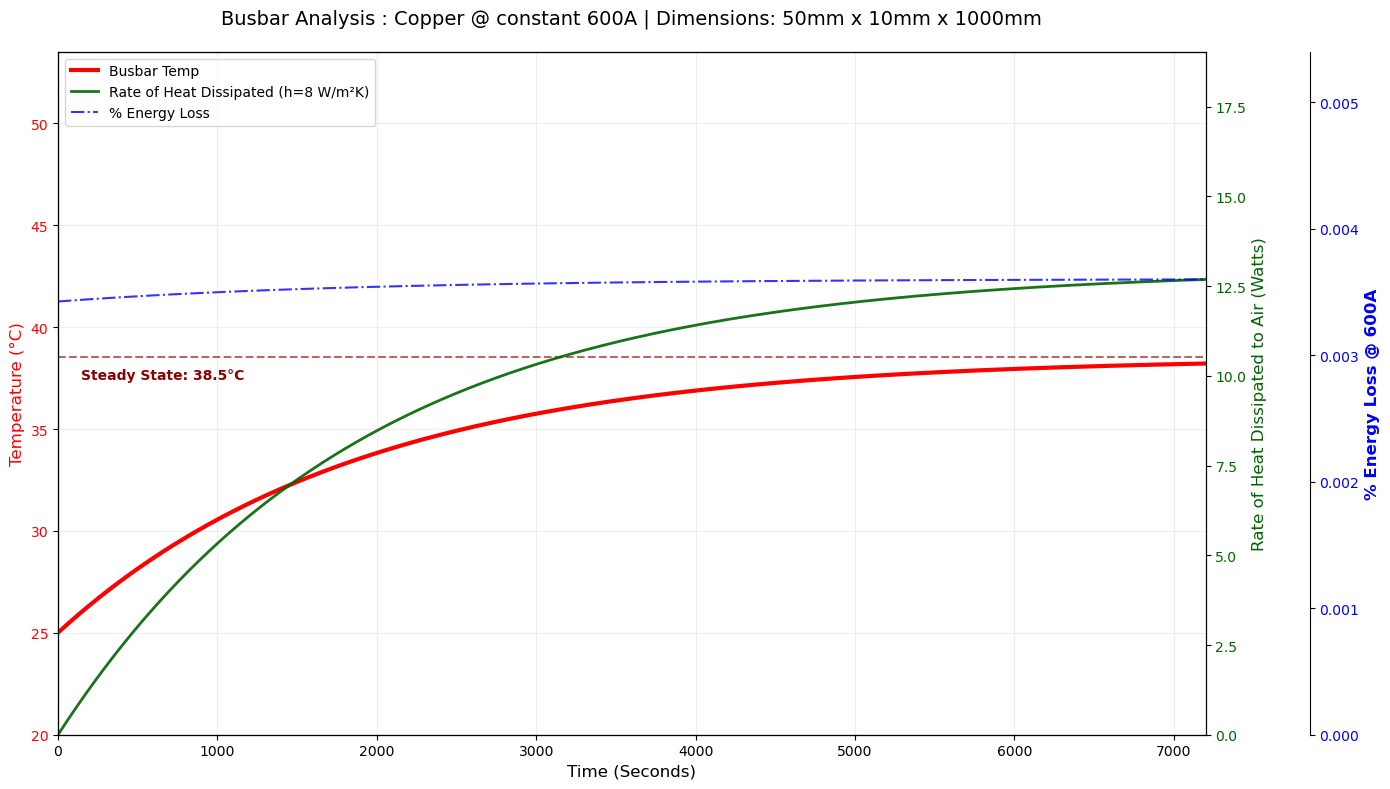
The plot shows three key metrics over a 2-hour simulation:
- Red line: Busbar temperature rising to steady state
- Green line: Rate of heat dissipated to air (convection)
- Blue dashed: Percentage energy loss
Summary Table
| Parameter | Value |
|---|---|
| Material | Copper |
| Dimensions (W x H x L) | 50mm x 10mm x 1000mm |
| Mass | 4.480 kg |
| Current | 600 A |
| h Coefficient | 8 W/m²K |
| Steady State Temp | 38.52 °C |
| Final Energy Loss | 0.0036 % |
Code
Python Implementation (click to expand)
import numpy as np
import matplotlib.pyplot as plt
import pandas as pd

# 1. MATERIAL DATABASE
materials = {
    'Copper': {'density': 8960, 'Cp': 385, 'alpha': 0.00393, 'rho_ref': 1.68e-8},
    'Aluminum': {'density': 2700, 'Cp': 897, 'alpha': 0.0039, 'rho_ref': 2.82e-8},
    'Brass': {'density': 8500, 'Cp': 377, 'alpha': 0.0020, 'rho_ref': 7.0e-8}
}

# 2. INPUTS
CHOSEN_MATERIAL = 'Copper'
I = 600                     # Current (A)
total_time = 7200           # 2 hours
V_load = 600                # System Voltage
h_conv = 8                  # Convection coeff (W/m^2*K)

# Realistic Dimensions (in meters)
L, w, h_dim = 1.0, 0.050, 0.010
T_amb, T_ref = 25, 20

# 3. SETUP & STEADY STATE
mat = materials[CHOSEN_MATERIAL]
A = w * h_dim
As = 2 * L * (w + h_dim)
mass = mat['density'] * (L * w * h_dim)
R_ref = mat['rho_ref'] * (L / A)

# Analytical Steady State
num = (I**2 * R_ref * (1 - mat['alpha'] * T_ref)) + (h_conv * As * T_amb)
den = (h_conv * As) - (I**2 * R_ref * mat['alpha'])
T_steady = num / den

# 4. SIMULATION ENGINE
dt = total_time / 5000
steps = int(total_time / dt)
time_axis = np.linspace(0, total_time, steps)

temp_history, q_conv_history, loss_history = np.zeros(steps), np.zeros(steps), np.zeros(steps)
T_current = T_amb

for i in range(steps):
    R_t = R_ref * (1 + mat['alpha'] * (T_current - T_ref))
    Q_gen = (I**2) * R_t
    Q_conv = h_conv * As * (T_current - T_amb)

    P_total = (I * V_load) + Q_gen
    energy_loss_pct = (Q_gen / P_total) * 100

    dT_dt = (Q_gen - Q_conv) / (mass * mat['Cp'])
    T_current += dT_dt * dt

    temp_history[i], q_conv_history[i], loss_history[i] = T_current, Q_conv, energy_loss_pct

# 5. VISUALIZATION
fig, ax1 = plt.subplots(figsize=(14, 8))

ax1.plot(time_axis, temp_history, color='red', linewidth=3, label='Busbar Temp')
ax1.axhline(y=T_steady, color='darkred', linestyle='--', alpha=0.6)
ax1.set_xlabel('Time (Seconds)')
ax1.set_ylabel('Temperature (°C)', color='red')

ax2 = ax1.twinx()
ax2.plot(time_axis, q_conv_history, color='darkgreen', linewidth=2,
         label=f'Heat Dissipated (h={h_conv} W/m²K)')
ax2.set_ylabel('Heat Dissipated (Watts)', color='darkgreen')

ax3 = ax1.twinx()
ax3.spines['right'].set_position(('outward', 75))
ax3.plot(time_axis, loss_history, color='blue', linestyle='-.', label='% Energy Loss')
ax3.set_ylabel(f'% Energy Loss @ {I}A', color='blue')

plt.title(f'Busbar Analysis: {CHOSEN_MATERIAL} @ {I}A')
plt.show()
To experiment with different materials, currents, or dimensions, open the notebook in Google Colab using the button at the top.